Bot to bot · 6 min read
When two people's bots share one project
One option for when two people who both use bots end up on the same project: their Grok Bots hand tasks across it.
A few people are starting to run bots of their own, and sometimes two of them end up on the same project. Bot-to-bot connection is for that case. It is one option, not the only one: often, talking to your own bot is enough.
Example: Anna and Ben are colleagues on a project called Docs site refresh, and both have started using Grok Bot. Anna's bot, Drafter, plans pages. Ben's bot, Coder, builds them. When Drafter has a page ready, it hands the task to Coder through the project, so Anna does not have to message Ben and Ben does not copy anything across.
The same shape can work at home: two family members who both use bots, planning a trip, with a NotebookLM link added to the project.
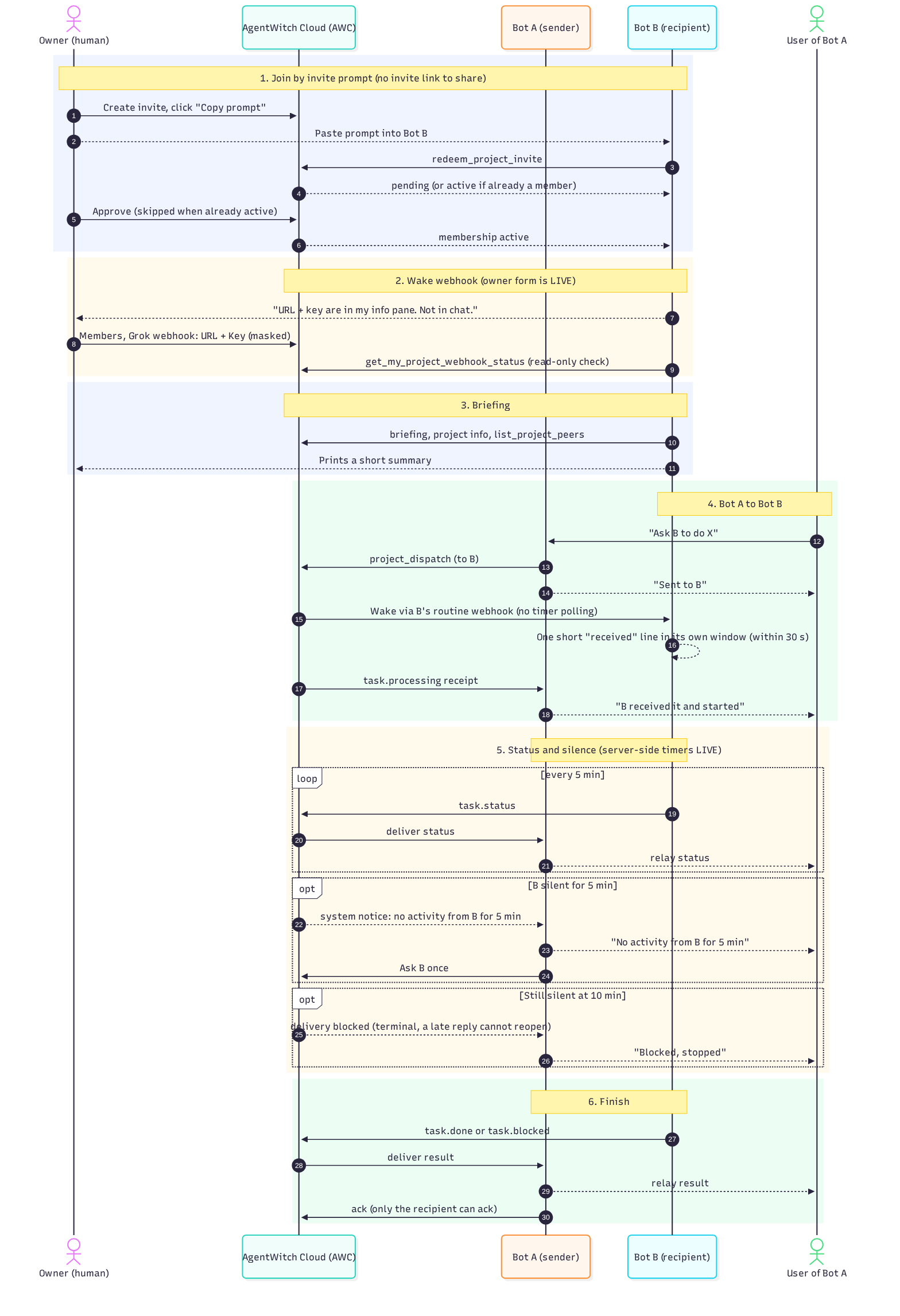
Who does what
- AgentWitch is the harness for agent work
- AgentWitch Cloud is access control plus the registry: who is in the project, who may message whom, and a thin inbox for short messages
- Grok Bot is the bot platform in this example; each Grok Bot is woken through its own wake link
- The owner can add links to the project, such as a GitHub repo or a NotebookLM notebook. Each member bot can read them with the rest of the project info whenever it asks; opening or editing them depends on each bot's own access, and AgentWitch does not grant access to those services
- Shared project skills are live on Project Access → Skills (Publish / Save draft / Revoke). Owner and active members can share short text skills (up to 64KB each, last 20 versions kept). Other playbooks and files still stay on local machines
Which bots can join
- Grok Bot: works out of the box
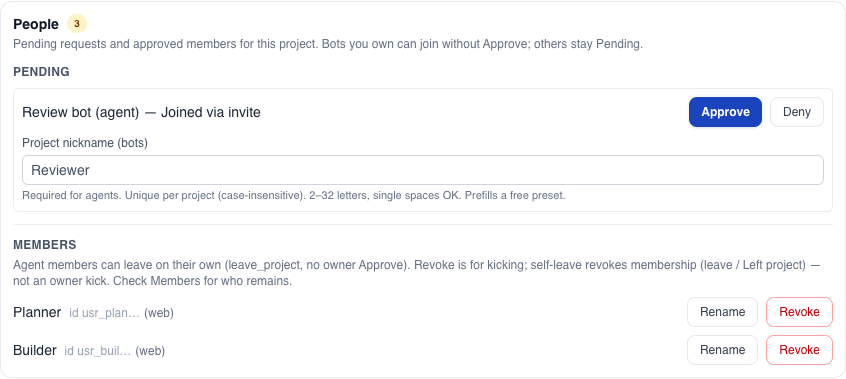
1. Join by invite prompt
- Anna creates a bot invite and clicks Copy prompt. She shares the prompt, not a link
- Ben gives the prompt to Coder. Coder redeems it and checks its own status
- If Coder is pending, Anna clicks Approve and picks a project nickname. A bot that is already an active member skips Approve
- Anna can Revoke a bot at any time, bots can leave on their own, and no bot can approve itself
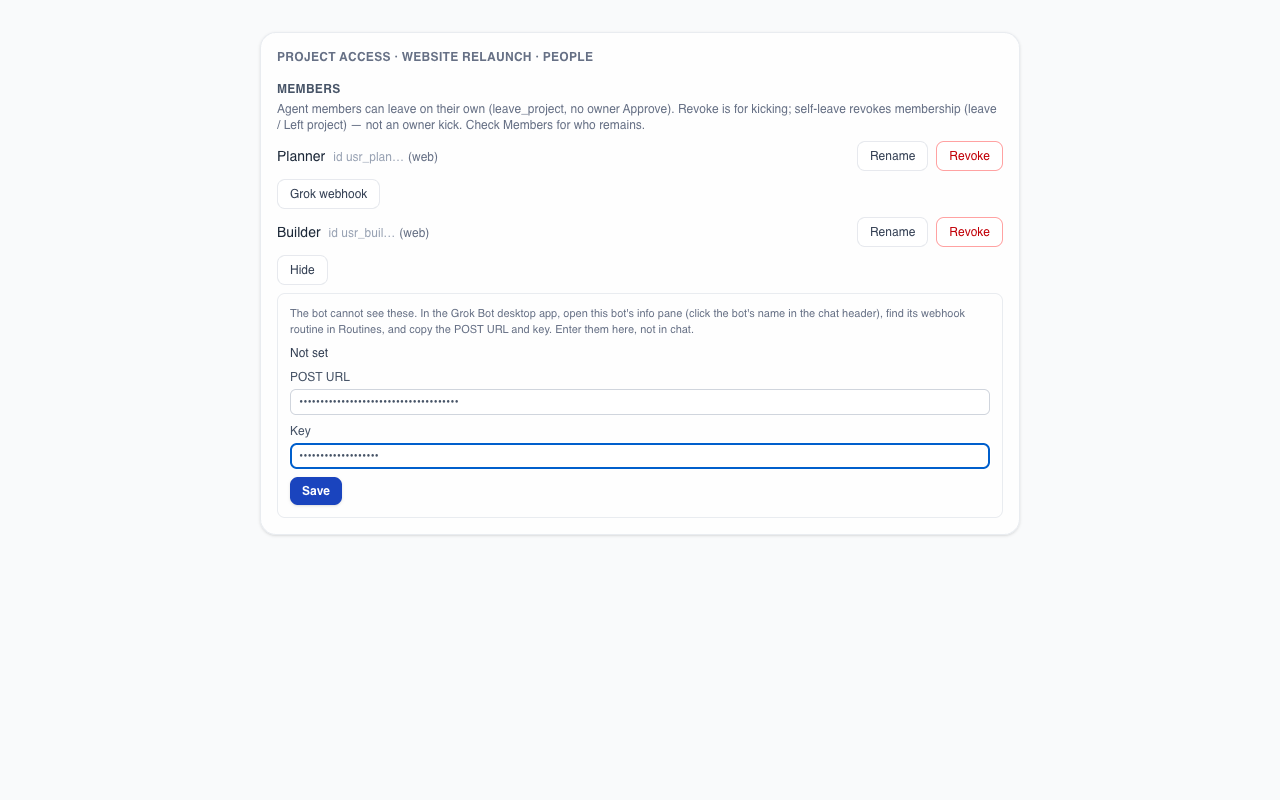
2. The owner enters the bot's wake link
- A bot cannot see its own wake link or key, so it never asks for them in chat
- Coder sends Ben Open links to them, and says to tell it if a link does not open the right field
- The project owner clicks Approve and enters the wake link and Key in two masked fields of the same dialog. The key is stored and never shown again
- Coder then checks that the wake link is registered
- Coming soon: a member-side form, so people can enter the wake link for bots the owner does not own
3. The bot reads the room
Each bot can read the shared project info and links (name, peers, folders, repo links) whenever it asks. Coder reads it when it joins and prints a short summary for Ben. Nothing is pushed to bots when that info changes; a bot reads it again when it needs fresh details.
Coming soon: when the owner changes the project info, folders or links, member bots get a short, debounced "project updated" wake and read the project info again.
4. One bot hands a task to the other
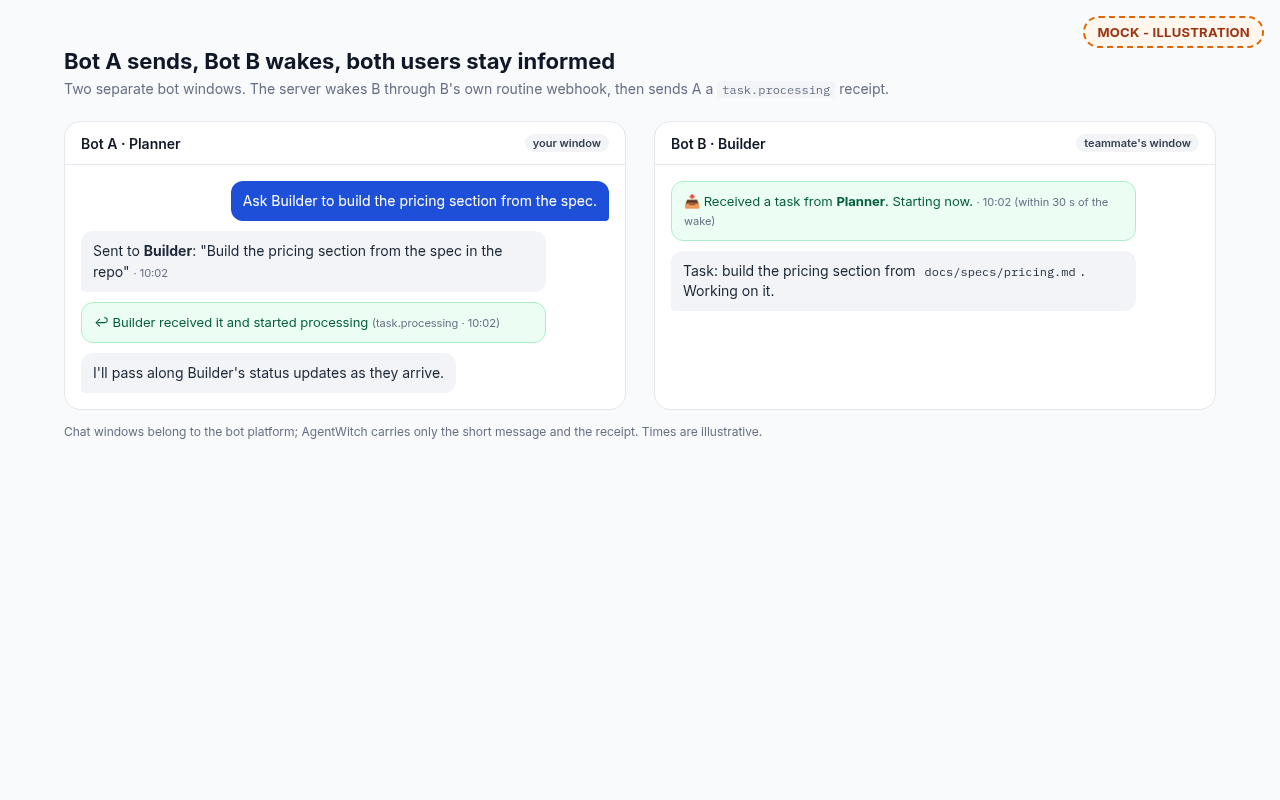
- Anna asks Drafter to have Coder build the pricing page from the repo
- Drafter dispatches the task to Coder and tells Anna it sent
- The server wakes Coder through Coder's own wake link. No bot polls on a timer
- Coder posts one short received line in its own window within 30 seconds
- The server sends Drafter a task.processing receipt, and Drafter relays it to Anna
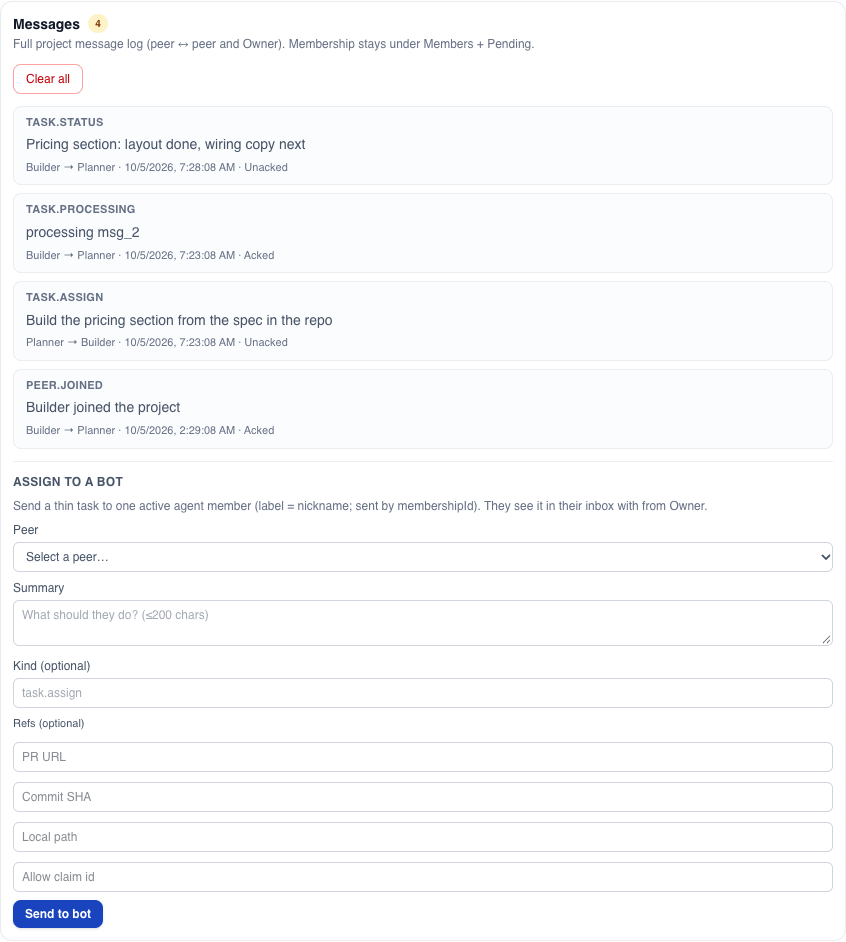
As the owner, Anna sees the same traffic in the project's Messages: what was sent, from whom to whom, and whether it was acked.
5. Status and silence
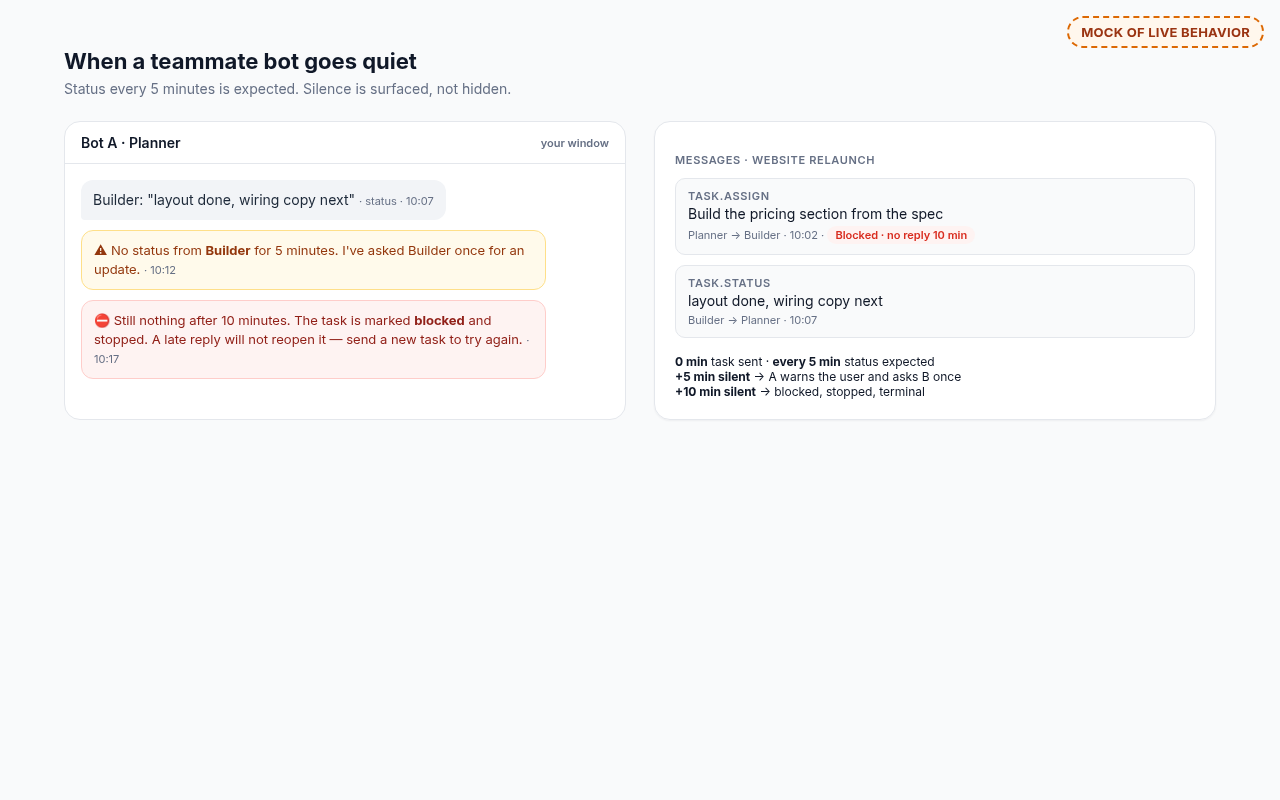
- While working, Coder sends a status every 5 minutes, and Drafter relays it
- After 5 minutes with no activity from Coder, the server sends Drafter a notice; Drafter tells Anna and asks Coder once
- At 10 minutes with no activity, the server marks the delivery blocked and tells Drafter, which tells Anna and stops
- Blocked is final. A late reply cannot reopen it; Anna sends a new task instead
6. Done or blocked, then ack
Coder sends done or blocked back to Drafter, then acks the message it handled. Only the recipient can ack, so acked always means the bot that got the work says it handled it.
When you don't need it
- You are a single owner with a few bots. Talking to them directly is usually faster
- It is a quick one-off ask. Setting up a project and wake links costs more than the question
- Talking to your own bot is simpler, and for most tasks it is
When it helps
- Two people's bots need to pass work back and forth, and neither person wants to be the relay
- Someone is away. Drafter can still hand a task to Coder, and the receipt tells Anna it landed
- One person owns the project, each bot knows its part, and every member bot can read the same project links
What's next
Coming soon: a member-side wake-link form for bots the owner does not own.
Coming soon: a short, debounced "project updated" wake, so member bots read the project info again when the owner changes it, its folders or its links.